
Shaper Origin
EXPERTENWISSEN ABZIEHLEDER
Shaper Origin - The mobile CNC revolution for precise work

The advantages at a glance:
- Precise timber joints: In combination with the Shaper Workstation, finger joints, mortise and tenon joints and other precision joints can be produced quickly and easily with maximum accuracy.
- Maximum flexibility: Whether in the workshop or on the construction site - the Shaper Origin is mobile and ready for immediate use. Install fittings, mill recesses or create precisely fitting connections directly on site.
- Perfect insertion of fittings: Countless templates from leading hardware manufacturers are available on the ShaperHub platform. This allows fittings to be recessed with maximum precision.
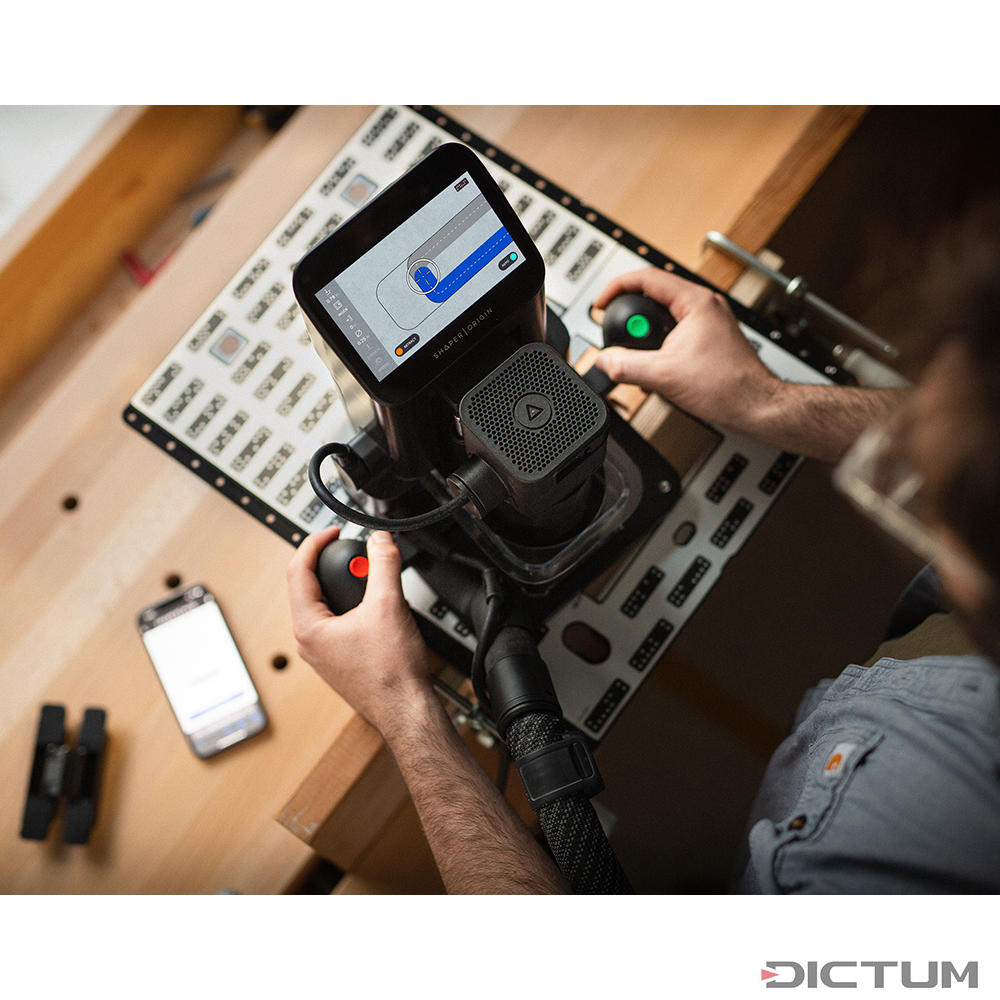
- Simple positioning with ShaperTape: The special tape is applied to the workpiece. The work surface is then scanned with the router and Origin automatically recognises and saves the information.
- No CAD knowledge is required: import routing data directly or create and edit designs directly on the router's touchscreen. Changes can be made in seconds to achieve the perfect fit.
Technical highlights of the Shaper Origin:
- Optimised for the wood sector: Classic tool design combined with innovative CNC technology.
- Use on large workpieces: Workpieces of any size possible thanks to mobile operation, without being limited by rails or templates or the clamping table of a CNC.
- Digital fine adjustment: Precise milling without templates thanks to the option of making digital adjustments directly on the machine.
- Wide range of design options: Mill contours, joints or engravings - all possible directly with the Origin.
- On-tool CAD function: Designs can be created and customised directly on the machine's touchscreen without additional software.
- Automatic routing correction: The intelligent routing correction adjusts the movement of the router in real time to ensure optimum routing quality.
- Simple operation: Even beginners can get started quickly with the intuitive user interface.
- Collet options: With different collets up to a maximum of 8 mm, a variety of cutters can be used.
The Shaper Origin combines the precision of a CNC milling machine with the flexibility of a hand-guided tool. Perfect for carpenters, furniture makers, floor layers and craftsmen who don't want to compromise when processing wood.
The Shaper Origin can be perfectly complemented by the accessories described below. There are almost no limits to the Origin.
Shaper Workstation

The perfect clamping device for precise milling with the Origin
The Shaper Workstation takes milling projects to a new level. This versatile clamping device enables workpieces to be fixed precisely - both horizontally and vertically. Even complex routing work such as creating finger joints, visible joints or mortise and tenon joints is easy, safe and repeatable. The workstation is the perfect partner for the Shaper Origin and offers maximum flexibility when processing workpieces of any size.
Size workpieces, narrow mouldings or small components - the height-adjustable workpiece support ensures optimum support. Thanks to numerous fastening options, workpieces can be clamped securely, making machining even faster and more efficient. The workstation can be permanently mounted on a workbench or used as a mobile workstation - exactly where you need it.
The advantages at a glance:
- Quick clamping: Securely fix workpieces horizontally or vertically - ideal for precise joints such as finger joints, dovetail joints or tenon joints.
- Work with repeat accuracy: Thanks to the stable and repeatable fixturing, complex routing work can be realised quickly and without errors.
- Flexible and mobile: The workstation can be attached to a workbench or used directly where it is needed.
- Height-adjustable workpiece carrier: Even small or narrow workpieces are securely fixed and can be processed precisely.
- Front panel with T-slots: The T-slots offer versatile fastening options to securely fix workpieces of the most diverse Shapes.
- Efficient milling processes: With the secure fixing and precise alignment of workpieces, you save time and achieve perfect results.
Hängeriemen
The universal routing aid for precise work with the Origin.
The Shaper Plate is the ideal complement to the Shaper Origin when it comes to the precise countersinking of fittings, the creation of inlay work or the routing of rows of holes in System 32. This versatile clamping device makes precise and repeatable work easier than ever before. Whether repairs, filler pieces or the precise fitting of fittings - with the Shaper Plate you can work quickly, safely and precisely.
Thanks to the perfect integration with ShaperHub's digital fittings catalogue, you can access a wide range of tested templates. Simply select the desired fitting, synchronise it with the Shaper Origin and get started straight away. This saves time and minimises errors.
The advantages at a glance:
- Precise insertion of fittings: Whether hinges, furniture connectors or fittings - the Shaper Plate enables a wide variety of fittings to be recessed accurately and quickly.
- Versatile areas of application: Routing rows of holes in System 32, inlay work or precisely fitting filler pieces - flexible use for many projects.
- Easy alignment: The integrated stops and crosshairs ensure that your workpiece is always perfectly positioned.
- Perfect fixation: Thanks to the non-slip mat on the underside, the shaper plate stays securely in place - even for demanding work.
- Seamless integration with ShaperHub: Access a large selection of digital fitting templates, synchronise them with the Shaper Origin and save valuable time during setup.
- Repeatable routing: Consistent accuracy, even when creating identical cut-outs or millwork.
Shaper Trace

From hand-drawn to digital precision.
Shaper Trace transforms any sketch, drawing or hand-drawn template into a precise vector graphic (SVG) - in just a few steps. Simply place the Trace frame over the drawing, take a photo and the Trace app does the rest. This makes it quick and easy to digitise your own designs and use them for further processing with laser cutters, foil cutters, CNC machines and other digital tools.
This innovative solution makes it possible to put creative ideas directly on paper by hand and then use them as scalable vector graphics (SVG). Shaper Trace thus offers a perfect connection between analogue creativity and digital precision.
The advantages at a glance:
- From sketch to vector graphic: Converts hand-drawn designs into scalable SVG files that can be further processed with CNC machines, laser cutters, foil cutters and more.
- Easy to use: Place the trace frame over the drawing, take a photo and the web app converts the image into a precise vector graphic.
- Universal further processing: The vector files (SVG) created can be used with various digital tools and machines - ideal for carpenters, designers, makers and creative minds.
- Fast digitisation: No complicated software required - simply use the sketch, frame and app.
- High precision: Create detailed vector graphics that are perfect for production.
Shaper Origin - how to start a milling process:
Step 1

Preparing the work surface
The digital Routers uses ShaperTape, a paper tape with domino-like graphics that is glued to the work surface. These orientation points enable the machine to continuously determine its position on the work surface in real time.
Before starting to work, tape must be applied to the workpiece or the surrounding work surface. To achieve optimum results, use tape strips no longer than 90 cm. The tape is applied so that the distance between the individual strips is 50-80 mm.
The orientation of the ShaperTape in relation to the workpiece (parallel/perpendicular/diagonal) is not decisive and can be adjusted to suit the project. However, the strips must not overlap.
The camera of the Shaper Origin is located on the back, between the LED lights. It is therefore important that the applied tape is in this field of vision so that the machine can capture the working area.
The ShaperTape must not be changed after scanning. It is best to always apply ShaperTape at the same height as the milling surface. Applying ShaperTape at different levels impairs the milling accuracy and quality.

Step 2

Scanning the work surface
Before you can start milling, the workpiece/work surface must be scanned. Place the machine on the work surface, tap scan mode on 'New scan'.
To start scanning, press the green button on the right handle. The Origin's camera is located at the back between the two LED lights. Move the machine smoothly across your work surface so that the camera can capture all dominoes.
The dominoes turn blue as soon as Origin has recognised them. If a domino is damaged, it cannot be recognised and remains black.


Pull the Shaper Origin close to you while scanning to capture the area you want to work on later. Origin adds this area to your digital workspace so that you can also align your contours with material structures or markings.
Once you have captured everything, press the green button and the scanning process will be completed. The Shaper Origin now assembles all scan fragments into a virtual workspace and saves it automatically.

Step 3
Milling basics
The milling mode is the centrepiece. Once the work area has been scanned and the contours to be milled have been placed, you switch to milling mode.


Left menu bar - Milling settings
The following settings can be found on the left-hand side (from top to bottom):
Milling process

When the Shaper Origin starts milling, the spindle plunges to the set depth. A black circle with a red progress indicator appears as it plunges.
As long as this progress indicator is displayed, you must not move Origin. If you do move it, the spindle will retract immediately so as not to damage the workpiece.

In the illustration above, the small white dot shows the position of the milling cutter. The outer white circle symbolises the correction/action radius of the spindle. Always keep the small dot within the correction range. If the small dot moves out of this radius, Origin will retract the spindle from the workpiece. The milling process can then be continued.
The above steps are just a brief insight into the technology used by the world's first CNC Routers. Of course, there are many other setting options available. Create your own CAD files with the ON-Tool CAD, load pre-made files (components, wood joints, lettering, etc.), or use the hardware catalogue on ShaperHub to use hundreds of free templates from top manufacturers. Turn photos into Scalable Vector Graphics (SVG) and mill the contours without the need to trace them.
Regular software updates are constantly expanding the Shaper Origin's Range of application. A CNC machine that gains functions over time and makes work processes even more efficient.
The motor of the Shaper Origin is built by Festool, but the machine itself is not sold by Festool. For short delivery times and routes, the Shaper Origin is assembled in Germany and delivered securely packaged in a sturdy Systainer (Systainer 3 T-Loc). The machine is also available in a starter pack with useful accessories.
